

Your TV, console, and soundbar run 24/7 even when off: the 2-minute fix can save $30 to $200 a year
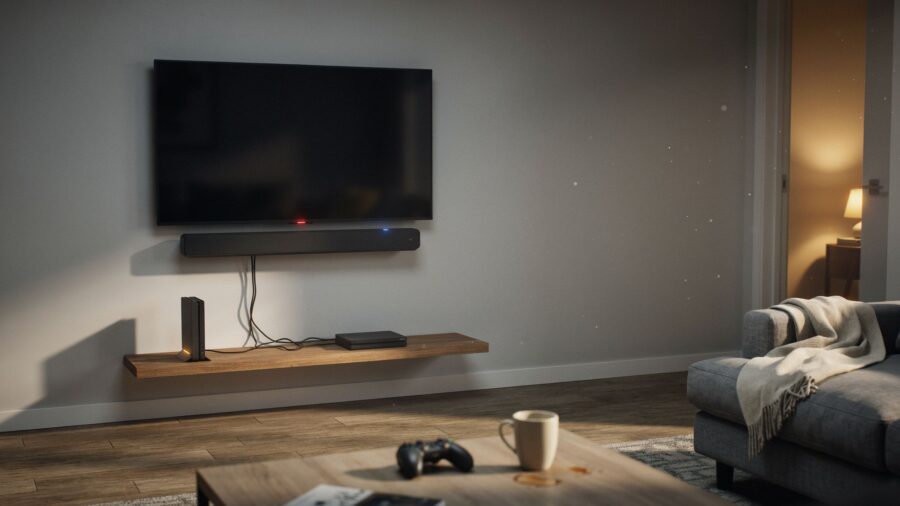
Walk into your living room after everyone’s gone to bed and take a look at your TV wall. You’ll almost always see a small glow. A red dot on the TV. A blue line on the soundbar. A soft light on the console. Everything’s “off.” And yet the wall’s quietly lit up like a tiny airport runway.
That runway is costing you money every single night.
Most people figure “off” means off. It doesn’t. Not for the gear on a modern TV wall. Your setup is pulling a little bit of power right now, has been all day, and will keep doing it tonight while you sleep. Tiny per hour. A lot per year.
The weird part isn’t that it’s happening. It’s which thing on your wall is doing the real damage. If you had to guess, you’d probably blame the biggest thing you can see. And you’d probably be wrong.
How bad is it, really?
The Lawrence Berkeley National Laboratory (the U.S. Department of Energy lab that basically wrote the book on this) says that the constant, always-on power draw from all those little glowing things in a normal American home adds up to 5 to 10 percent of the home’s total electricity use. In some homes they tested, it hit 26 percent.
In dollars, the Natural Resources Defense Council (NRDC) says the average U.S. household loses about $165 a year to this. The National Renewable Energy Laboratory puts it closer to $200.
So it’s happening in your home. The question is which piece of gear is the real culprit.
It isn’t the TV
You’d think the biggest screen on the wall would pull the most. It doesn’t. Not anymore.
Modern TVs are actually pretty good when they’re off. ENERGY STAR rules say a certified TV can only pull half a watt or less when it’s fully off. Half a watt for a whole year of being “off” costs you about 70 cents at the U.S. average electricity price. That’s basically nothing.
So if it’s not the TV, then what?
Not the cable box either
Most folks, once the TV’s off the hook, guess the cable box or DVR next. They’re closer. Older cable boxes can pull 20 watts or more around the clock (they stay half-awake to record shows and update the channel guide). That does add up.
But cable boxes are fading out for a lot of homes, replaced by streaming sticks that pull almost nothing. And even in homes that still have one, it’s not the biggest silent drain anymore.
The soundbar? A watt or two. The streaming stick? Even less. The modem and router do need to stay on, and they cost you some money, but they aren’t the surprise either.
The surprise is something small. Something that just sits there on your shelf, screen dark, no fan noise, just a tiny LED on the front. It looks completely off.
But it isn’t. Not even close.
It’s been that way since the day you plugged it in, because that’s the setting it shipped with. And almost nobody thinks to change factory settings on a machine that “just works.” You wouldn’t. Most of us don’t.
That one untouched setting is where a big chunk of your money’s quietly going. Every day. Every night. Whether you’re home or not.
What’s actually eating up the power
It’s your gaming console.
If you own one, it almost certainly shipped with a “fast start” mode turned on by default. And that one setting is quietly doing more damage to your electric bill than the TV, soundbar, and streaming stick put together. On the Xbox Series X or Series S, it’s called Instant On. On the PlayStation 5, it’s called Rest Mode. Both do the same thing: keep the machine half-awake so it boots up in 5 seconds instead of 30, download updates while you sleep, and let you jump right back into your game.
The catch is that “half-awake” costs power. Every hour. All day. All night.
The NRDC tested this and found that an Xbox Series X or S in Instant On pulls 9 to 13 watts, nonstop. Even when you’re asleep, at work, or on vacation for a week. At the U.S. average electricity price (around 16 cents per unit, or roughly €0.15 per kWh in the EU), that one setting wastes about $13 to $18 a year (roughly €12–17) doing nothing at all. The PS5 is easier on the wallet at around 1.3 watts in Rest Mode (per Sony’s own specs), climbing to 3.2 watts if you’ve turned on charging your controllers or overnight downloads.
Now add the console to the soundbar, cable box, modem, router, and any chargers on the same wall. A normal setup runs 20 to 60 watts nonstop. Over a year, that’s your $30 to $200 (roughly €28–185), depending on your rate, your gear, and mostly on whether your console is in fast-start mode.
If any of that sounds like your living room, you’re not alone. It’s the default in most American homes.
The 2-minute fix
There are two ways to solve this. Do both if you can.
Fix 1: Change one setting on your console. Free. Takes 60 seconds.
On your Xbox, open Settings > General > Power mode & startup and switch from Instant On to Energy Saving. Your console will now take about 5–10 seconds longer to boot up. That’s it. That’s the whole downside. The NRDC crunched the numbers and figured that if every U.S. Xbox owner flipped this one setting, it’d save enough power to shut down a big coal power plant (500 megawatts, enough to power a few hundred thousand homes).
On your PS5, open Settings > System > Power Saving > Features Available in Rest Mode and switch off “Supply Power to USB Ports” and “Stay Connected to the Internet” unless you actually need them overnight.
Fix 2: Put your whole TV wall on one switched power strip. Costs about $10 to $35 (roughly €10–35). Takes 2 minutes.
A “switched” power strip is just a regular power strip with a big on/off switch on the end. Plug your TV, soundbar, streaming stick, and console into it. When you’re done for the night, flip the switch. Everything goes truly off. Zero power draw. One flip.
A “smart” power strip (also called an advanced power strip) does the same thing on its own. You plug one device (usually the TV) into a “control” outlet, and the rest into “controlled” outlets. When you shut off the TV, the strip cuts power to the rest within a few seconds. No thinking required. The U.S. Department of Energy and National Renewable Energy Laboratory both recommend these for TV walls, and utility data shared by Efficiency Vermont says they can save up to $100 a year (roughly €93) on a gaming setup alone.
Two things to watch out for:
Don’t put your modem, router, cable box, or DVR on the switched side. These need to stay on to hold your internet or record shows, and cutting a DVR mid-recording can wreck the file. Use the strip’s “always on” outlets or a separate wall socket for those.
Never plug fridges, medical devices, or space heaters into a switched or smart strip. They need steady power, and they pull way too much current for these strips to handle safely.
You get a small bonus from either option too: surge protection, which shields your gear from small voltage spikes that can slowly wear it down. (For serious lightning storms, unplugging is still safer.)
Sources: (1) Lawrence Berkeley National Laboratory, Standby Power; (2) U.S. Department of Energy, 3 Easy Tips to Reduce Your Standby Power Loads; (3) ENERGY STAR, Product Retrospective: Televisions (PDF); (4) Natural Resources Defense Council, Xbox Series X/S Instant On analysis (via FlatpanelsHD coverage); (5) U.S. Department of Energy, Choose the Right Advanced Power Strip for You; (6) National Renewable Energy Laboratory, Saving Energy Through Advanced Power Strips (PDF); (7) Efficiency Vermont, Energy Efficient Advanced Power Strips; (8) Sony PS5 published power specifications (via GamesRadar reporting).
The post Your TV, console, and soundbar run 24/7 even when off: the 2-minute fix can save $30 to $200 a year appeared first on Trendir.